
Download SageMath Cloud – Mathematical Calculations, Collaborative Computing, Online Document Editing
Overview
SageMath Cloud is a cloud-based platform designed for performing advanced mathematical computations with a strong emphasis on real-time collaboration. Built upon the open-source Sage software, it provides users with a dynamic environment to execute complex calculations, develop mathematical models, and share work seamlessly across teams. The app serves as a digital workspace for mathematicians, researchers, educators, and students who require a flexible and powerful tool for computational mathematics. Its core purpose is to eliminate the dependency on local software installations by offering full functionality through a web browser, accessible from any device with an internet connection.
By enabling simultaneous editing and live interaction among multiple users, SageMath Cloud addresses common challenges in collaborative academic and research projects. It is particularly useful in educational settings where instructors and students can work together on problem sets, simulations, and assignments in real time. The platform also supports various mathematical languages such as Maxima and SymPy, allowing users to choose their preferred syntax and computational framework.
This adaptability enhances usability across different disciplines within mathematics and related sciences. While the developer did not provide additional technical details, the app’s open-source nature suggests transparency and community-driven development, fostering trust and long-term sustainability. Its presence in the mobile app ecosystem highlights a growing trend toward accessible, cloud-native tools for technical professionals and learners alike.
Key Features & Functionality
- Collaborative Computing: Multiple users can edit and run mathematical code simultaneously, enabling real-time teamwork on complex projects. This is ideal for group assignments, research collaborations, or classroom instruction where instant feedback is crucial.
- Online Document Editing: Users can create, modify, and share mathematical documents directly in the browser without installing additional software. This feature ensures accessibility from any device and simplifies version control and file sharing.
- Support for Multiple Mathematical Languages: The platform integrates with languages like Maxima and SymPy, allowing users to leverage their preferred computational syntax and tools. This flexibility supports diverse workflows and educational needs.
- Continuous Updates: As an evolving platform, SageMath Cloud regularly introduces new features and improvements. Users benefit from ongoing enhancements that keep the tool aligned with modern computational demands.
- Open Source Accessibility: Being open source, the app is free to use and allows users to inspect and modify the underlying code. This promotes transparency, community contributions, and customization for specialized use cases.
For example, a university professor can initiate a live coding session with students, allowing everyone to run and debug equations in real time. Similarly, a research team working on a modeling project can share datasets, scripts, and results without file transfer delays. The platform’s ability to support multiple languages ensures that users are not locked into a single system, increasing its utility across different academic and professional environments.
Interface, UX & Performance
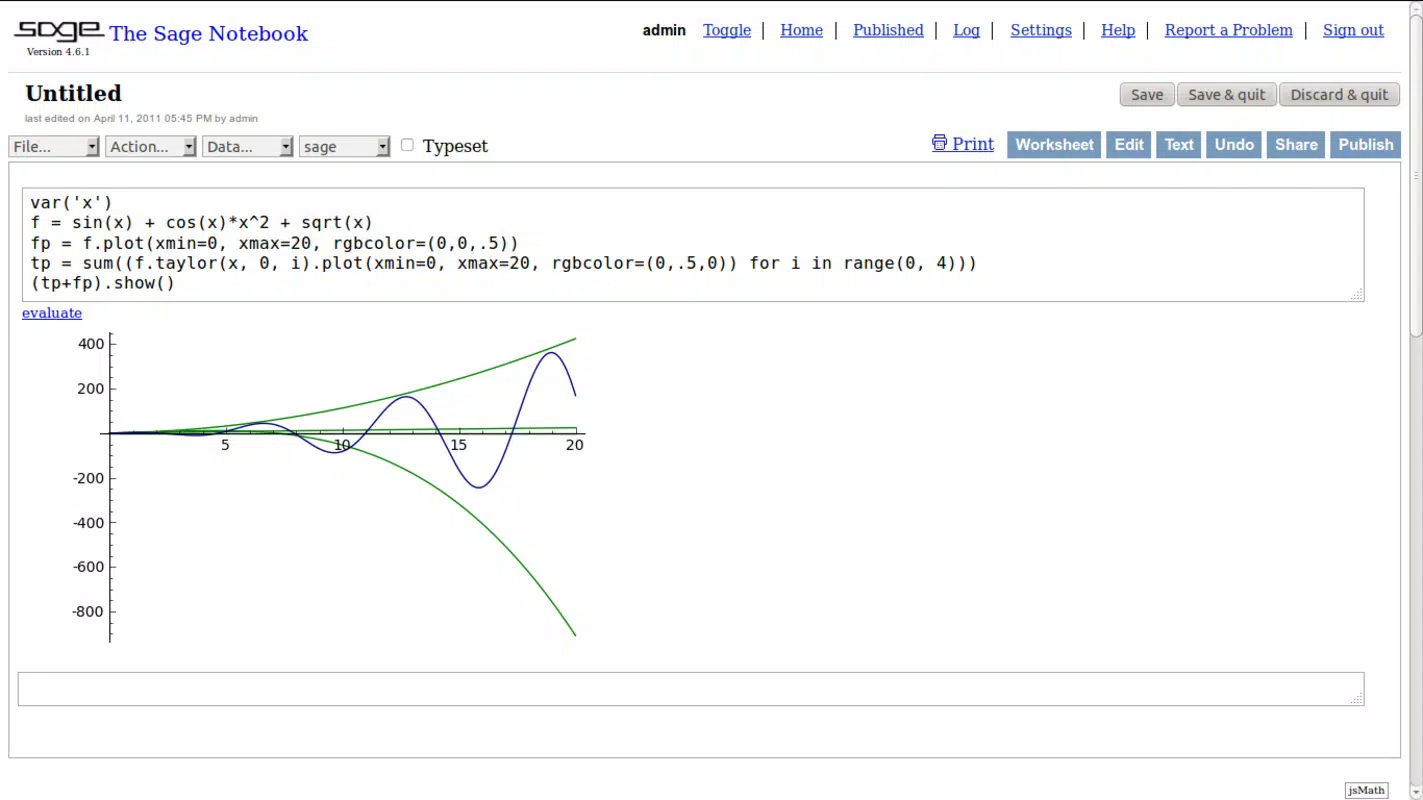
The user interface of SageMath Cloud is designed with functionality and clarity in mind, prioritizing ease of access to core tools. The layout centers around a workspace where code, documentation, and outputs are displayed in a structured, tab-based format. Navigation is intuitive, with menus and toolbars positioned for quick access to file management, computation engines, and collaboration controls. Visual elements are minimal but effective, focusing on content rather than ornamentation, which enhances readability and reduces cognitive load.
Although the developer did not list formal performance metrics, the app’s cloud-based architecture suggests consistent responsiveness across a range of devices, including smartphones and tablets. Users can expect smooth interaction when running lightweight to moderately complex calculations. Stability appears to be maintained through regular updates, though specific information about crash rates or load times was not provided.
The platform’s reliance on internet connectivity means performance may vary depending on network quality. However, the absence of local installation requirements reduces the risk of device-specific compatibility issues. Overall, the user experience is optimized for productivity, with a focus on seamless workflow integration between coding, documentation, and collaboration.
Platform Compatibility & Technical Requirements
SageMath Cloud is available as a web-based application, accessible through modern mobile browsers on both Android and iOS platforms. The developer did not specify minimum OS versions or exact file size requirements. Compatibility information was not fully disclosed, and no native app version was explicitly mentioned. Users should ensure their device supports current web standards and has a stable internet connection to use the platform effectively.
Given its cloud-native nature, the app does not require installation or storage space on the device, making it ideal for users with limited storage capacity. However, the absence of a dedicated mobile app may affect the user experience on smaller screens, particularly when handling complex code or multiple panes. The developer did not provide details about supported screen sizes, touch optimization, or offline functionality. While the platform functions across various device categories, specific performance expectations remain unconfirmed.
Pros and Cons
Pros
- Real-time collaborative computing for team-based mathematical projects
- Online access eliminates the need for local software installation
- Supports multiple mathematical languages, increasing flexibility
- Regular updates ensure continuous improvement and feature expansion
- Open source and free to use, promoting accessibility and transparency
Cons
- Platform compatibility and technical requirements were not fully disclosed
- No dedicated mobile app was mentioned, potentially limiting native functionality
- Dependence on internet connectivity may affect usability in low-bandwidth areas
- Specific performance metrics and device optimization details were not provided
- Interface may be less intuitive on smaller mobile screens without dedicated app support
FAQ
Is SageMath Cloud free to use?
Yes, SageMath Cloud is an open-source tool and is available at no cost to users. The open-source model allows for free access, community contributions, and transparency in development.
Can I use SageMath Cloud on my smartphone?
Yes, SageMath Cloud can be accessed via a web browser on smartphones. However, the developer did not specify whether a dedicated mobile app is available or how well the interface performs on smaller screens.
Do I need to install software to use SageMath Cloud?
No, the platform operates entirely in the browser. There is no need to install any software or applications on your device, making it accessible from any internet-connected device.
Is my data secure when using SageMath Cloud?
While the developer did not provide specific security details, the platform operates on secure web protocols. Users are advised to follow best practices for account protection, especially when sharing sensitive mathematical work.
How often is SageMath Cloud updated?
SageMath Cloud is described as a continuously evolving platform, with regular updates introducing new features and improvements. The frequency of updates is not specified, but the open-source nature suggests ongoing community-driven development.
Final Thoughts
SageMath Cloud stands out as a powerful, accessible tool for anyone involved in mathematical computation and collaboration. Its cloud-based design, support for multiple languages, and real-time teamwork features make it a valuable asset in academic, research, and educational environments. While the lack of detailed technical specifications and a dedicated mobile app may pose limitations for some users, the platform’s core strengths lie in its flexibility, openness, and ease of access.
For students, educators, and researchers seeking a secure, free, and collaborative workspace for mathematical work, SageMath Cloud offers a compelling solution. Its continuous evolution ensures it remains relevant in a fast-changing digital landscape. Download SageMath Cloud now.


